

Filling the room is really hard work.
I promote every webinar the same way: as a waterfall. The powerful free channels go first, each step down costs a little more, and paid ads comes last, just to fill whatever seats are still empty. It’s how I get to 300+ attendees without an ad budget, and it works the same for a webinar, a workshop, a livestream, or a launch event.
Clay does this better than anyone right now ↓
Their GTM webinars have pulled 19,000 registrations, each one a lead that cost them under $12. Most from channels that cost next to nothing. One exec’s LinkedIn post brought in 4,000 registrations on its own!
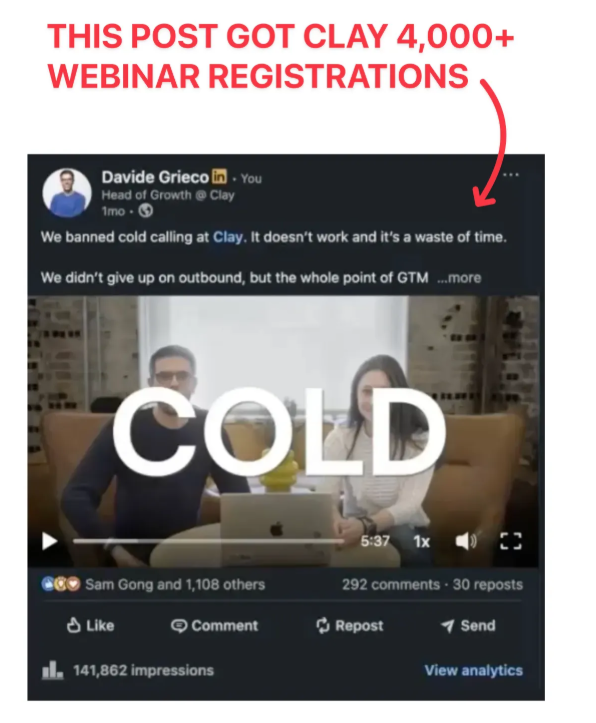
I talked with the team at Clay expecting some secret system. But they run the same waterfall.
I’ve been running this “waterfall” method on my webinars for YEARS, so I finally wrote everything down: all 6 channels that get more attendees (with 2 channels I stole from Clay), the best $0 distribution tactics, and the counterintuitive reminder email that gets registrants to actually show up.
Here’s exactly what to do before your next webinar ↓
My waterfall, top to bottom
- Your own people, posting from their own profiles (free, most trusted)
- A webinar guest with a bigger audience (free, borrowed reach)
- Your email list (free, highest intent)
- One-to-one invites (slow, highest pull per message)
- Communities and partners (someone else’s audience)
- Paid (last, and cheap first)
Each level down costs more and converts colder, so you only drop a level to fill the seats the ones above didn’t. By the time money enters the picture, the room should already be mostly full.
1. Start with your own people
LinkedIn posts from real people get 2-3x the reach of the company page. But your colleagues never write these posts on their own (full playbook here), so write it for them:
Hey team, would love some support on this ”
A finished post they can publish as-is, sent the morning registration opens
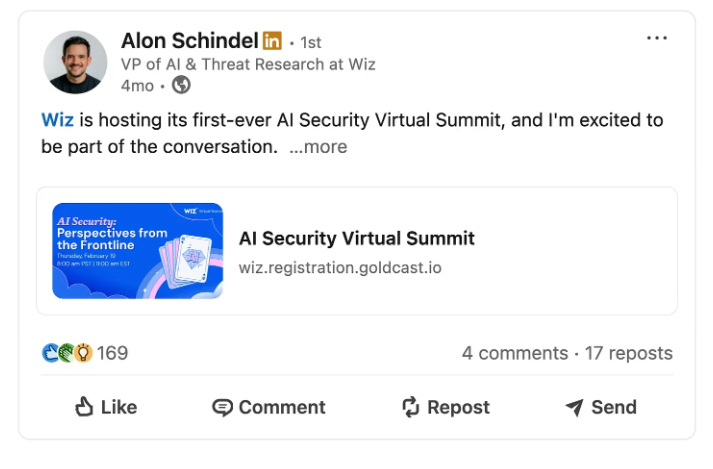
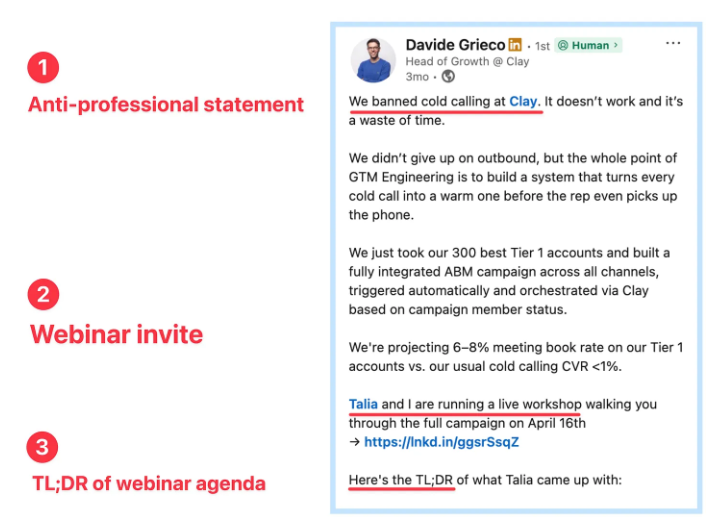
- Open with an “anti-professional” statement: Take the most controversial opinion from your webinar and state it as fact: “We banned. It doesn’t work and it’s a waste of time”. My #1 rule for LinkedIn posts.
- Put the webinar invite in the MIDDLE of the post (not the end!). Just one casual line with the date and the link, right before the agenda.
- Include a TL;DR of the webinar agenda: Give the actual agenda away. People who like the plan sign up to see it live.
Also steal the last line: “If you want to run Clay’s ABM playbook, tag your marketing team so they can join us”.
And the video is perfect: just the two webinar hosts talking about the webinar’s topic, casual and funny. People register for people they like. If you don’t want to do a video: post a photo of the thing you’ll show live (or one juicy slide from the deck).
2. Borrow a bigger audience
Invite a guest with a bigger audience than yours. Their name pulls registrants you can’t reach, and their share puts the event in front of an audience you don’t have. It’s the biggest growth hack I’ve ever seen with live events.
The ask is easy:
Hey [name], we’re running a live session on [their usual topic] on [date] and want you as the guest. You talk for 15 minutes on Zoom, we handle everything else. Want in?
At Wiz, one guest’s post out-pulled everything our team sent that week. Humbling, since I wrote what our team sent
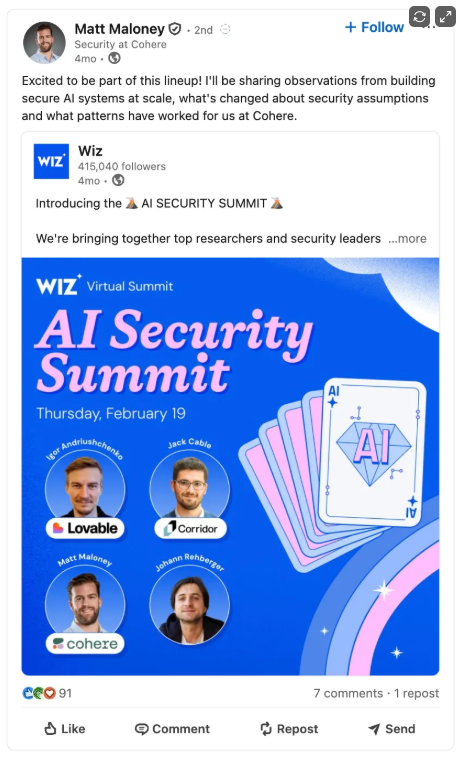
To get guests to actually share: send a personal graphic (their face + talk title on a branded card) plus a caption they can paste, spicy opinion up top.
It works on me too:
someone sends me a card with my face on it, I post it. Send the kit when the registration page goes live.
3. Hit your big email list
Your email list is the easiest win here: these people already said YES to hearing from you.
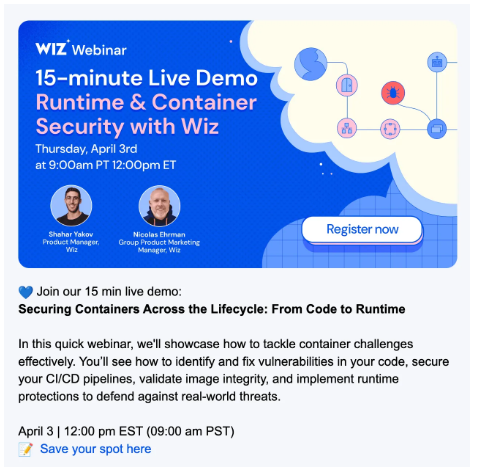
One email when registration opens, one the morning of the event, a third the day before, only if your guest is worth bragging about. Don’t overdo it. (The daily-reminder barrage comes later, for registrants only). You can also include a webinar invite it in your regular newsletter to prospects and customers.
Here’s an example from the Wiz email for customers (“product updates”):
4. Send one-to-one invites
Don’t send these to strangers. Send them to prospects you’re already talking to and to your best customers.
The webinar gives you a real reason to reach out, wayyy better than “just checking in”. Clay’s sellers get a ready-made invite kit every Monday and invite their accounts in a couple of clicks. I love it.
Keep yours to three lines:
Hey [name], we’re doing a live session on [topic] on [date]. Thought of you. Want me to save you a spot?
Write it once, send it to ten people, done. If you have sellers (SDRs, AEs, etc) → give each of them ten names.
5. Rent other people’s platforms
Slack groups, Discord servers, newsletters, communities: every place your buyers hang out is a room someone else already filled. But you can’t just drop a link, mods delete it.
Give the owner of the platform a REASON to want you there:
Invite a partner to co-host. Now it’s their event too, so they promote it to their entire list.
Pitch the community owner a session on the topic members keep asking about (link the thread where they asked).
Or swap: they push your webinar, you push theirs next month.
It costs a favor instead of money. That’s why it comes before ads.
6. Paid goes last
Ads amplify pull that already exists. If no one cares about the webinar, ads won’t save it. So paid goes last and starts cheap.
Cut 30 seconds from a past webinar and run it on Meta, where a talking clip barely reads as an ad. Clay does this with their livestreams, and it works because the viewer is three sentences in before realizing they’re being marketed to. By then they’re curious.
STILL SHORT ON SEATS?
Keep descending: a newsletter sponsorship, broader audiences, cold outreach. Every step down costs more and converts colder. That’s the price of the bottom of the waterfall, and the reason everything above it fires first.
Bonus experiments that work wonders
Gate a LinkedIn livestream behind your registration page. Stream on LinkedIn, but the livestream can only be seen to people who registered. Every viewer leaves contact details, and a viewer with contact details is a lead. See example from Wiz.
Raffle something live. Attendees only, drawn during the event. People will rearrange a workday for a branded mug. I’ve stopped questioning it.
Replace the text “register” with “apply” when people sign up. It makes it sound more exclusive.
Give the event your homepage’s top banner the week before. MineOS, where I used to work, is running one right now, a thin strip above the nav that goes straight to registration. Your highest-intent visitors are already on the site.
How to make registrants actually show up
Registrations mean little if half of them ghost you, and half of them will. Show-up is its own campaign, aimed only at people who already registered.
Send a reminder EVERY DAY the week before, plus one the morning of. Yes, you’ll feel needy. Send it anyway. Show-up rates live and die on reminders.
Then send the counterintuitive email:
“We’re fully booked. The platform maxed out, so if you can’t make it, please cancel your spot so someone else can attend.”
You’d expect a wave of cancellations, but trust me, almost no one cancels.
The opposite happens: Registrants suddenly feel chosen, the event starts looking like the place to be, and the people who were 50/50 clear their calendar for it.
I’ve filled a lot of rooms over the years, and money had almost nothing to do with it. People show up for people. And raffles. But mostly people.